记忆是存储先前交互信息的系统。对于 AI 代理来说,记忆至关重要,因为它使它们能够记住先前的交互、从反馈中学习并适应用户偏好。随着代理处理包含众多用户交互的更复杂任务,这种能力对于效率和用户满意度都变得至关重要。 短期记忆让你的应用程序能够记住单个线程或对话中的先前交互。一个线程在一个会话中组织多个交互,类似于电子邮件在一个对话中分组消息的方式。
checkpointer。
LangChain 的代理将短期记忆作为代理状态的一部分进行管理。通过将这些存储在图的状态中,代理可以访问给定对话的完整上下文,同时保持不同线程之间的分离。状态使用检查点器持久化到数据库(或内存),以便线程可以随时恢复。短期记忆在代理被调用或一个步骤(如工具调用)完成时更新,并在每个步骤开始时读取状态。
import { createAgent } from "langchain";
import { MemorySaver } from "@langchain/langgraph";

const checkpointer = new MemorySaver();

const agent = createAgent({
    model: "claude-sonnet-4-5-20250929",
    tools: [],
    checkpointer,
});

await agent.invoke(
    { messages: [{ role: "user", content: "hi! i am Bob" }] },
    { configurable: { thread_id: "1" } }
);
生产环境
在生产中,使用由数据库支持的检查点器
import { PostgresSaver } from "@langchain/langgraph-checkpoint-postgres";

const DB_URI = "postgresql://postgres:postgres@localhost:5442/postgres?sslmode=disable";
const checkpointer = PostgresSaver.fromConnString(DB_URI);
自定义代理记忆
默认情况下,代理使用 @[AgentState] 通过 messages 键来管理短期记忆,特别是会话历史。 你可以扩展 @[AgentState] 以添加其他字段。自定义状态模式通过 @[state_schema] 参数传递给 @[create_agent]。import * as z from "zod";
import { createAgent, createMiddleware } from "langchain";
import { MessagesZodState, MemorySaver } from "@langchain/langgraph";
const customStateSchema = z.object({
messages: MessagesZodState.shape.messages,
userId: z.string(),
preferences: z.record(z.string(), z.any()),
});
const stateExtensionMiddleware = createMiddleware({
name: "StateExtension",
stateSchema: customStateSchema,
});
const checkpointer = new MemorySaver();
const agent = createAgent({
model: "gpt-5",
tools: [],
middleware: [stateExtensionMiddleware] as const,
checkpointer,
});
// Custom state can be passed in invoke
const result = await agent.invoke({
messages: [{ role: "user", content: "Hello" }],
userId: "user_123",
preferences: { theme: "dark" },
});
常见模式
启用短期记忆后,长对话可能会超出 LLM 的上下文窗口。常见的解决方案有:
这使得代理可以跟踪对话,而不会超出 LLM 的上下文窗口。
截断消息
大多数 LLM 都有一个最大支持上下文窗口(以 token 计)。 决定何时截断消息的一种方法是计算消息历史中的 token 数量,并在接近该限制时进行截断。如果你正在使用 LangChain,你可以使用修剪消息实用程序,并指定要从列表中保留的 token 数量,以及用于处理边界的 strategy(例如,保留最后 maxTokens)。 要在代理中修剪消息历史,请使用 stateModifier 和 trimMessages 函数:import {
createAgent,
trimMessages,
type AgentState,
} from "langchain";
import { MemorySaver } from "@langchain/langgraph";
// This function will be called every time before the node that calls LLM
const stateModifier = async (state: AgentState) => {
return {
messages: await trimMessages(state.messages, {
strategy: "last",
maxTokens: 384,
startOn: "human",
endOn: ["human", "tool"],
tokenCounter: (msgs) => msgs.length,
}),
};
};
const checkpointer = new MemorySaver();
const agent = createAgent({
model: "gpt-5",
tools: [],
preModelHook: stateModifier,
checkpointer,
});
删除消息
你可以从图状态中删除消息以管理消息历史。 这在你想删除特定消息或清除整个消息历史时非常有用。 要从图状态中删除消息,你可以使用 RemoveMessage。为了使 RemoveMessage 工作,你需要使用带有 messagesStateReducer reducer 的状态键,例如 MessagesZodState。 要删除特定消息:import { RemoveMessage } from "@langchain/core/messages";
const deleteMessages = (state) => {
const messages = state.messages;
if (messages.length > 2) {
// remove the earliest two messages
return {
messages: messages
.slice(0, 2)
.map((m) => new RemoveMessage({ id: m.id })),
};
}
};
删除消息时,请确保生成的消息历史有效。检查你正在使用的 LLM 提供商的限制。例如:
- 某些提供商要求消息历史以
user 消息开头
- 大多数提供商要求带有工具调用的
assistant 消息后跟相应的 tool 结果消息。
import { RemoveMessage } from "@langchain/core/messages";
import { AgentState, createAgent } from "langchain";
import { MemorySaver } from "@langchain/langgraph";

const deleteMessages = (state: AgentState) => {
    const messages = state.messages;
    if (messages.length > 2) {
        // remove the earliest two messages
        return {
        messages: messages
            .slice(0, 2)
            .map((m) => new RemoveMessage({ id: m.id! })),
        };
    }
    return {};
};

const agent = createAgent({
    model: "gpt-5-nano",
    tools: [],
    prompt: "Please be concise and to the point.",
    postModelHook: deleteMessages,
    checkpointer: new MemorySaver(),
});

const config = { configurable: { thread_id: "1" } };

const streamA = await agent.stream(
    { messages: [{ role: "user", content: "hi! I'm bob" }] },
    { ...config, streamMode: "values" }
);
for await (const event of streamA) {
    const messageDetails = event.messages.map((message) => [
        message.getType(),
        message.content,
    ]);
    console.log(messageDetails);
}

const streamB = await agent.stream(
    {
        messages: [{ role: "user", content: "what's my name?" }],
    },
    { ...config, streamMode: "values" }
);
for await (const event of streamB) {
    const messageDetails = event.messages.map((message) => [
        message.getType(),
        message.content,
    ]);
    console.log(messageDetails);
}
[['human', "hi! I'm bob"]]
[['human', "hi! I'm bob"], ['ai', 'Hi Bob! How are you doing today? Is there anything I can help you with?']]
[['human', "hi! I'm bob"], ['ai', 'Hi Bob! How are you doing today? Is there anything I can help you with?'], ['human', "what's my name?"]]
[['human', "hi! I'm bob"], ['ai', 'Hi Bob! How are you doing today? Is there anything I can help you with?'], ['human', "what's my name?"], ['ai', 'Your name is Bob.']]
[['human', "what's my name?"], ['ai', 'Your name is Bob.']]
总结消息
修剪或删除消息(如上所示)的问题在于,你可能会因为删除消息队列而丢失信息。因此,一些应用程序受益于使用聊天模型总结消息历史的更复杂方法。 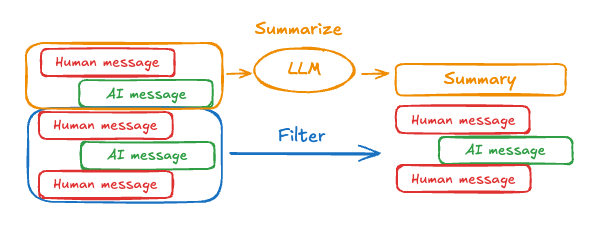 要在代理中总结消息历史,请使用内置的
summarizationMiddleware:import { createAgent, summarizationMiddleware } from "langchain";
import { MemorySaver } from "@langchain/langgraph";
const checkpointer = new MemorySaver();
const agent = createAgent({
model: "gpt-4o",
tools: [],
middleware: [
summarizationMiddleware({
model: "gpt-4o-mini",
maxTokensBeforeSummary: 4000,
messagesToKeep: 20,
}),
],
checkpointer,
});
const config = { configurable: { thread_id: "1" } };
await agent.invoke({ messages: "hi, my name is bob" }, config);
await agent.invoke({ messages: "write a short poem about cats" }, config);
await agent.invoke({ messages: "now do the same but for dogs" }, config);
const finalResponse = await agent.invoke({ messages: "what's my name?" }, config);
console.log(finalResponse.messages.at(-1)?.content);
// Your name is Bob!
summarizationMiddleware。
访问记忆
你可以通过多种方式访问和修改代理的短期记忆(状态)
使用 ToolRuntime 参数在工具中访问短期记忆(状态)。 tool_runtime 参数在工具签名中是隐藏的(因此模型看不到),但工具可以通过它访问状态。import * as z from "zod";
import { createAgent, tool } from "langchain";
const stateSchema = z.object({
userId: z.string(),
});
const getUserInfo = tool(
async (_, config) => {
const userId = config.context?.userId;
return { userId };
},
{
name: "get_user_info",
description: "Get user info",
schema: z.object({}),
}
);
const agent = createAgent({
model: "gpt-5-nano",
tools: [getUserInfo],
stateSchema,
});
const result = await agent.invoke(
{
messages: [{ role: "user", content: "what's my name?" }],
},
{
context: {
userId: "user_123",
},
}
);
console.log(result.messages.at(-1)?.content);
// Outputs: "User is John Smith."
import * as z from "zod";
import { tool, createAgent } from "langchain";
import { MessagesZodState, Command } from "@langchain/langgraph";

const CustomState = z.object({
    messages: MessagesZodState.shape.messages,
    userName: z.string().optional(),
});

const updateUserInfo = tool(
    async (_, config) => {
        const userId = config.context?.userId;
        const name = userId === "user_123" ? "John Smith" : "Unknown user";
        return new Command({
        update: {
            userName: name,
            // update the message history
            messages: [
            {
                role: "tool",
                content: "Successfully looked up user information",
                tool_call_id: config.toolCall?.id,
            },
            ],
        },
        });
    },
    {
        name: "update_user_info",
        description: "Look up and update user info.",
        schema: z.object({}),
    }
);

const greet = tool(
    async (_, config) => {
        const userName = config.context?.userName;
        return `Hello ${userName}!`;
    },
    {
        name: "greet",
        description: "Use this to greet the user once you found their info.",
        schema: z.object({}),
    }
);

const agent = createAgent({
    model,
    tools: [updateUserInfo, greet],
    stateSchema: CustomState,
});

await agent.invoke(
    { messages: [{ role: "user", content: "greet the user" }] },
    { context: { userId: "user_123" } }
);
import * as z from "zod";
import { createAgent, tool, SystemMessage } from "langchain";

const contextSchema = z.object({
    userName: z.string(),
});

const getWeather = tool(
    async ({ city }, config) => {
        return `The weather in ${city} is always sunny!`;
    },
    {
        name: "get_weather",
        description: "Get user info",
        schema: z.object({
        city: z.string(),
        }),
    }
);

const agent = createAgent({
    model: "gpt-5-nano",
    tools: [getWeather],
    contextSchema,
    prompt: (state, config) => {
        return [
        new SystemMessage(
            `You are a helpful assistant. Address the user as ${config.context?.userName}.`
        ),
        ...state.messages,
    },
});

const result = await agent.invoke(
    {
        messages: [{ role: "user", content: "What is the weather in SF?" }],
    },
    {
        context: {
        userName: "John Smith",
        },
    }
);

for (const message of result.messages) {
    console.log(message);
}
/**
 * HumanMessage {
 *   "content": "What is the weather in SF?",
 *   // ...
 * }
 * AIMessage {
 *   // ...
 *   "tool_calls": [
 *     {
 *       "name": "get_weather",
 *       "args": {
 *         "city": "San Francisco"
 *       },
 *       "type": "tool_call",
 *       "id": "call_tCidbv0apTpQpEWb3O2zQ4Yx"
 *     }
 *   ],
 *   // ...
 * }
 * ToolMessage {
 *   "content": "The weather in San Francisco is always sunny!",
 *   "tool_call_id": "call_tCidbv0apTpQpEWb3O2zQ4Yx"
 *   // ...
 * }
 * AIMessage {
 *   "content": "John Smith, here's the latest: The weather in San Francisco is always sunny!\n\nIf you'd like more details (temperature, wind, humidity) or a forecast for the next few days, I can pull that up. What would you like?",
 *   // ...
 * }
 */
模型前
在 @[@before_model] 中间件中访问短期记忆(状态),以在模型调用之前处理消息。
import { RemoveMessage } from "@langchain/core/messages";
import { createAgent, createMiddleware, trimMessages, type AgentState } from "langchain";

const trimMessageHistory = createMiddleware({
  name: "TrimMessages",
  beforeModel: async (state) => {
    const trimmed = await trimMessages(state.messages, {
      maxTokens: 384,
      strategy: "last",
      startOn: "human",
      endOn: ["human", "tool"],
      tokenCounter: (msgs) => msgs.length,
    });
    return { messages: trimmed };
  },
});

const agent = createAgent({
    model: "gpt-5-nano",
    tools: [],
    middleware: [trimMessageHistory],
});
模型后
在 @[@after_model] 中间件中访问短期记忆(状态),以在模型调用之后处理消息。
import { RemoveMessage } from "@langchain/core/messages";
import { createAgent, createMiddleware, type AgentState } from "langchain";

const validateResponse = createMiddleware({
  name: "ValidateResponse",
  afterModel: (state) => {
    const lastMessage = state.messages.at(-1)?.content;
    if (typeof lastMessage === "string" && lastMessage.toLowerCase().includes("confidential")) {
      return {
        messages: [new RemoveMessage({ id: "all" }), ...state.messages],
      };
    }
    return;
  },
});

const agent = createAgent({
    model: "gpt-5-nano",
    tools: [],
    middleware: [validateResponse],
});

