在某些情况下,出于隐私或安全原因,您可能需要阻止跟踪的输入和输出被记录。LangSmith 提供了一种在跟踪发送到 LangSmith 后端之前过滤其输入和输出的方法。 如果您想完全隐藏跟踪的输入和输出,您可以在运行应用程序时设置以下环境变量:LANGSMITH_HIDE_INPUTS=true
LANGSMITH_HIDE_OUTPUTS=true
Client 实例的行为。这可以通过设置 Client 对象上的 hide_inputs 和 hide_outputs 参数来完成(TypeScript 中为 hideInputs 和 hideOutputs)。 对于下面的示例,我们将简单地为 hide_inputs 和 hide_outputs 返回一个空对象,但您可以根据需要自定义此设置。import openai
from langsmith import Client
from langsmith.wrappers import wrap_openai
openai_client = wrap_openai(openai.Client())
langsmith_client = Client(
hide_inputs=lambda inputs: {}, hide_outputs=lambda outputs: {}
)
# The trace produced will have its metadata present, but the inputs will be hidden
openai_client.chat.completions.create(
model="gpt-4o-mini",
messages=[
{"role": "system", "content": "You are a helpful assistant."},
{"role": "user", "content": "Hello!"},
],
langsmith_extra={"client": langsmith_client},
)
# The trace produced will not have hidden inputs and outputs
openai_client.chat.completions.create(
model="gpt-4o-mini",
messages=[
{"role": "system", "content": "You are a helpful assistant."},
{"role": "user", "content": "Hello!"},
],
)
此功能在以下 LangSmith SDK 版本中可用
- Python:0.1.81 及更高版本
- TypeScript:0.1.33 及更高版本
create_anonymizer / createAnonymizer 函数,并在实例化客户端时传递新创建的匿名器。匿名器可以由正则表达式模式列表和替换值构建,也可以由接受并返回字符串值的函数构建。 如果 LANGSMITH_HIDE_INPUTS = true,匿名器将跳过输入。如果 LANGSMITH_HIDE_OUTPUTS = true,则输出也适用。 但是,如果输入或输出要发送到客户端,则 anonymizer 方法将优先于 hide_inputs 和 hide_outputs 中找到的函数。默认情况下,create_anonymizer 将仅查看最大 10 个嵌套级别,这可以通过 max_depth 参数进行配置。from langsmith.anonymizer import create_anonymizer
from langsmith import Client, traceable
import re
# create anonymizer from list of regex patterns and replacement values
anonymizer = create_anonymizer([
{ "pattern": r"[a-zA-Z0-9._%+-]+@[a-zA-Z0-9.-]+.[a-zA-Z]{2,}", "replace": "<email-address>" },
{ "pattern": r"[0-9a-fA-F]{8}-[0-9a-fA-F]{4}-[0-9a-fA-F]{4}-[0-9a-fA-F]{4}-[0-9a-fA-F]{12}", "replace": "<UUID>" }
])
# or create anonymizer from a function
email_pattern = re.compile(r"[a-zA-Z0-9._%+-]+@[a-zA-Z0-9.-]+.[a-zA-Z]{2,}")
uuid_pattern = re.compile(r"[0-9a-fA-F]{8}-[0-9a-fA-F]{4}-[0-9a-fA-F]{4}-[0-9a-fA-F]{4}-[0-9a-fA-F]{12}")
anonymizer = create_anonymizer(
lambda text: email_pattern.sub("<email-address>", uuid_pattern.sub("<UUID>", text))
)
client = Client(anonymizer=anonymizer)
@traceable(client=client)
def main(inputs: dict) -> dict:
...
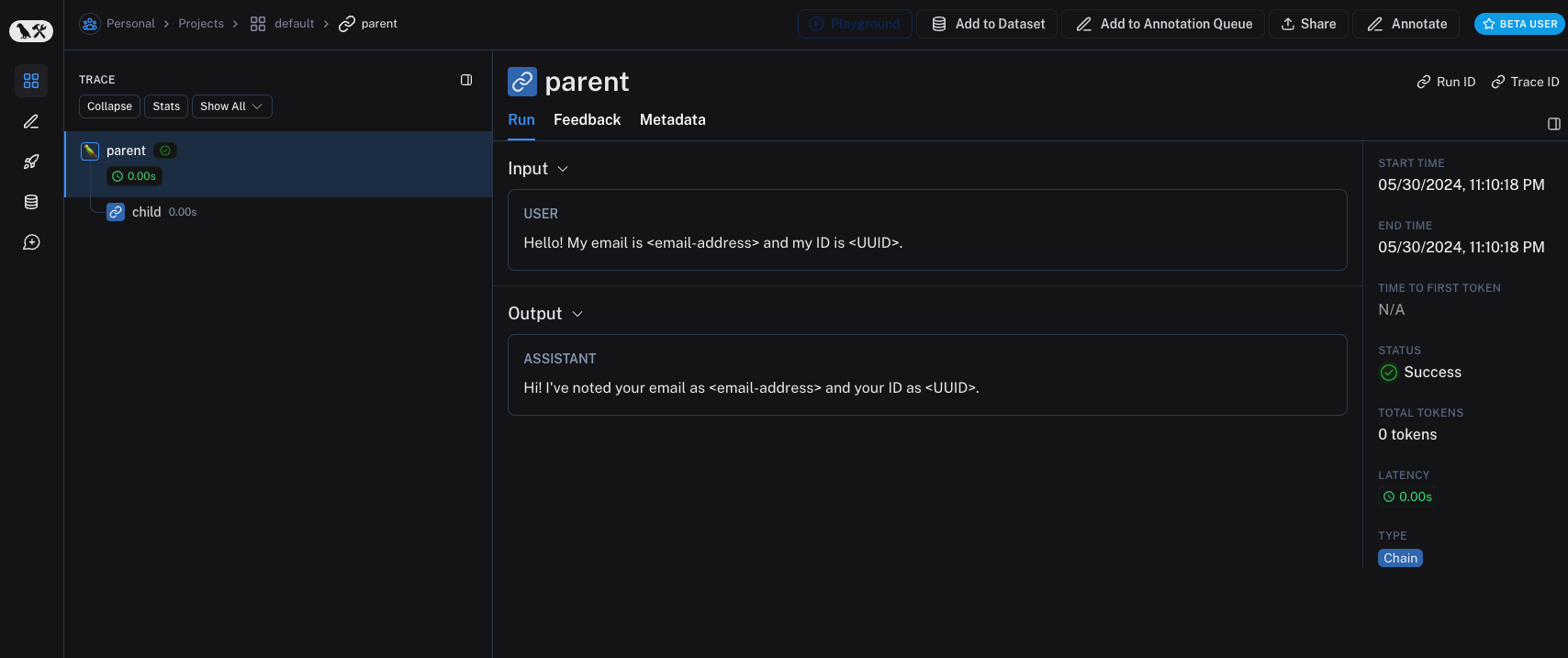 较旧版本的 LangSmith SDK 可以使用
 hide_inputs 和 hide_outputs 参数实现相同的效果。您还可以使用这些参数更有效地处理输入和输出。import re
from langsmith import Client, traceable
# Define the regex patterns for email addresses and UUIDs
EMAIL_REGEX = r"[a-zA-Z0-9._%+-]+@[a-zA-Z0-9.-]+.[a-zA-Z]{2,}"
UUID_REGEX = r"[0-9a-fA-F]{8}-[0-9a-fA-F]{4}-[0-9a-fA-F]{4}-[0-9a-fA-F]{4}-[0-9a-fA-F]{12}"
def replace_sensitive_data(data, depth=10):
if depth == 0:
return data
if isinstance(data, dict):
return {k: replace_sensitive_data(v, depth-1) for k, v in data.items()}
elif isinstance(data, list):
return [replace_sensitive_data(item, depth-1) for item in data]
elif isinstance(data, str):
data = re.sub(EMAIL_REGEX, "<email-address>", data)
data = re.sub(UUID_REGEX, "<UUID>", data)
return data
else:
return data
client = Client(
hide_inputs=lambda inputs: replace_sensitive_data(inputs),
hide_outputs=lambda outputs: replace_sensitive_data(outputs)
)
inputs = {"role": "user", "content": "Hello! My email is user@example.com and my ID is 123e4567-e89b-12d3-a456-426614174000."}
outputs = {"role": "assistant", "content": "Hi! I've noted your email as user@example.com and your ID as 123e4567-e89b-12d3-a456-426614174000."}
@traceable(client=client)
def child(inputs: dict) -> dict:
return outputs
@traceable(client=client)
def parent(inputs: dict) -> dict:
child_outputs = child(inputs)
return child_outputs
parent(inputs)
process_outputs 参数在 Python 的 LangSmith SDK 0.1.98 及更高版本中可用。
@traceable 装饰器的 process_inputs 和 process_outputs 参数提供函数级别的处理。 这些参数接受函数,允许您在将特定函数的输入和输出记录到 LangSmith 之前对其进行转换。这对于减少负载大小、删除敏感信息或自定义对象在 LangSmith 中如何序列化和表示以用于特定函数很有用。 以下是如何使用 process_inputs 和 process_outputs 的示例:from langsmith import traceable
def process_inputs(inputs: dict) -> dict:
# inputs is a dictionary where keys are argument names and values are the provided arguments
# Return a new dictionary with processed inputs
return {
"processed_key": inputs.get("my_cool_key", "default"),
"length": len(inputs.get("my_cool_key", ""))
}
def process_outputs(output: Any) -> dict:
# output is the direct return value of the function
# Transform the output into a dictionary
# In this case, "output" will be an integer
return {"processed_output": str(output)}
@traceable(process_inputs=process_inputs, process_outputs=process_outputs)
def my_function(my_cool_key: str) -> int:
# Function implementation
return len(my_cool_key)
result = my_function("example")
process_inputs 创建一个包含已处理输入数据的新字典,而 process_outputs 在记录到 LangSmith 之前将输出转换为特定格式。
建议避免在处理器函数中修改源对象。相反,使用已处理的数据创建并返回新对象。
@traceable(process_inputs=process_inputs, process_outputs=process_outputs)
async def async_function(key: str) -> int:
    # Async implementation
    return len(key)
hide_inputs 和 hide_outputs)时,函数级处理器优先。
快速入门
您可以将基于规则的掩码与各种匿名器结合使用,以清除输入和输出中的敏感信息。在本操作指南中,我们将介绍如何使用正则表达式、Microsoft Presidio 和 Amazon Comprehend。
正则表达式
以下实现并非详尽无遗,可能会遗漏某些格式或边缘情况。在生产中使用任何实现之前,请务必进行彻底测试。
import re
import openai
from langsmith import Client
from langsmith.wrappers import wrap_openai

# Define regex patterns for various PII
SSN_PATTERN = re.compile(r'\b\d{3}-\d{2}-\d{4}\b')
CREDIT_CARD_PATTERN = re.compile(r'\b(?:\d[ -]*?){13,16}\b')
EMAIL_PATTERN = re.compile(r'\b[A-Za-z0-9._%+-]+@[A-Za-z0-9.-]+\.[A-Z|a-z]{2,7}\b')
PHONE_PATTERN = re.compile(r'\b(?:\+?1[-.\s]?)?\(?\d{3}\)?[-.\s]?\d{3}[-.\s]?\d{4}\b')
FULL_NAME_PATTERN = re.compile(r'\b([A-Z][a-z]*\s[A-Z][a-z]*)\b')

def regex_anonymize(text):
    """
    Anonymize sensitive information in the text using regex patterns.
    Args:
        text (str): The input text to be anonymized.
    Returns:
        str: The anonymized text.
    """
    # Replace sensitive information with placeholders
    text = SSN_PATTERN.sub('[REDACTED SSN]', text)
    text = CREDIT_CARD_PATTERN.sub('[REDACTED CREDIT CARD]', text)
    text = EMAIL_PATTERN.sub('[REDACTED EMAIL]', text)
    text = PHONE_PATTERN.sub('[REDACTED PHONE]', text)
    text = FULL_NAME_PATTERN.sub('[REDACTED NAME]', text)
    return text

def recursive_anonymize(data, depth=10):
    """
    Recursively traverse the data structure and anonymize sensitive information.
    Args:
        data (any): The input data to be anonymized.
        depth (int): The current recursion depth to prevent excessive recursion.
    Returns:
        any: The anonymized data.
    """
    if depth == 0:
        return data
    if isinstance(data, dict):
        anonymized_dict = {}
        for k, v in data.items():
            anonymized_value = recursive_anonymize(v, depth - 1)
            anonymized_dict[k] = anonymized_value
        return anonymized_dict
    elif isinstance(data, list):
        anonymized_list = []
        for item in data:
            anonymized_item = recursive_anonymize(item, depth - 1)
            anonymized_list.append(anonymized_item)
        return anonymized_list
    elif isinstance(data, str):
        anonymized_data = regex_anonymize(data)
        return anonymized_data
    else:
        return data

openai_client = wrap_openai(openai.Client())

# Initialize the LangSmith client with the anonymization functions
langsmith_client = Client(
    hide_inputs=recursive_anonymize, hide_outputs=recursive_anonymize
)

# The trace produced will have its metadata present, but the inputs and outputs will be anonymized
response_with_anonymization = openai_client.chat.completions.create(
    model="gpt-4o-mini",
    messages=[
        {"role": "system", "content": "You are a helpful assistant."},
        {"role": "user", "content": "My name is John Doe, my SSN is 123-45-6789, my credit card number is 4111 1111 1111 1111, my email is john.doe@example.com, and my phone number is (123) 456-7890."},
    ],
    langsmith_extra={"client": langsmith_client},
)

# The trace produced will not have anonymized inputs and outputs
response_without_anonymization = openai_client.chat.completions.create(
    model="gpt-4o-mini",
    messages=[
        {"role": "system", "content": "You are a helpful assistant."},
        {"role": "user", "content": "My name is John Doe, my SSN is 123-45-6789, my credit card number is 4111 1111 1111 1111, my email is john.doe@example.com, and my phone number is (123) 456-7890."},
    ],
)
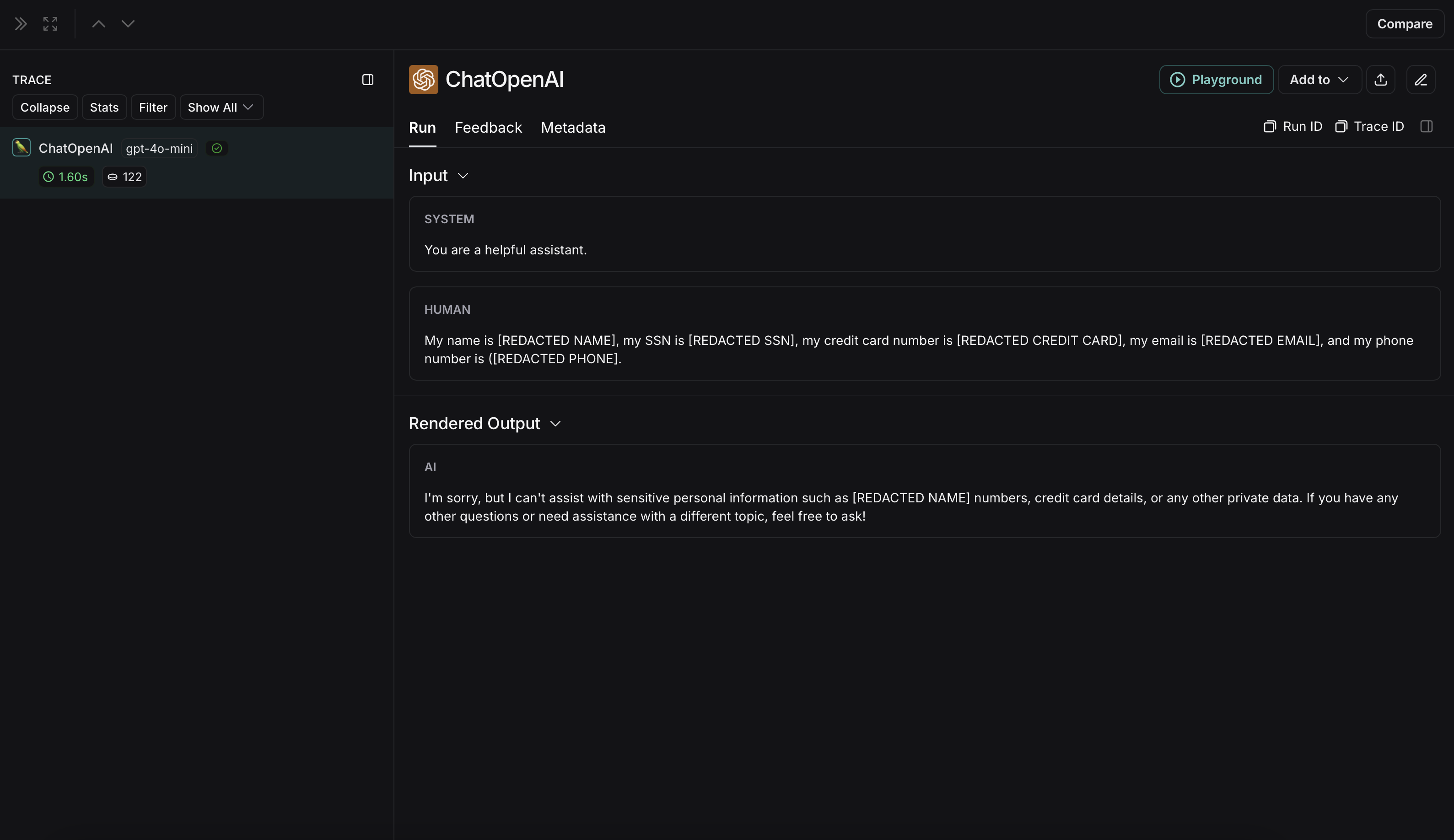 未匿名化运行在 LangSmith 中将如下所示: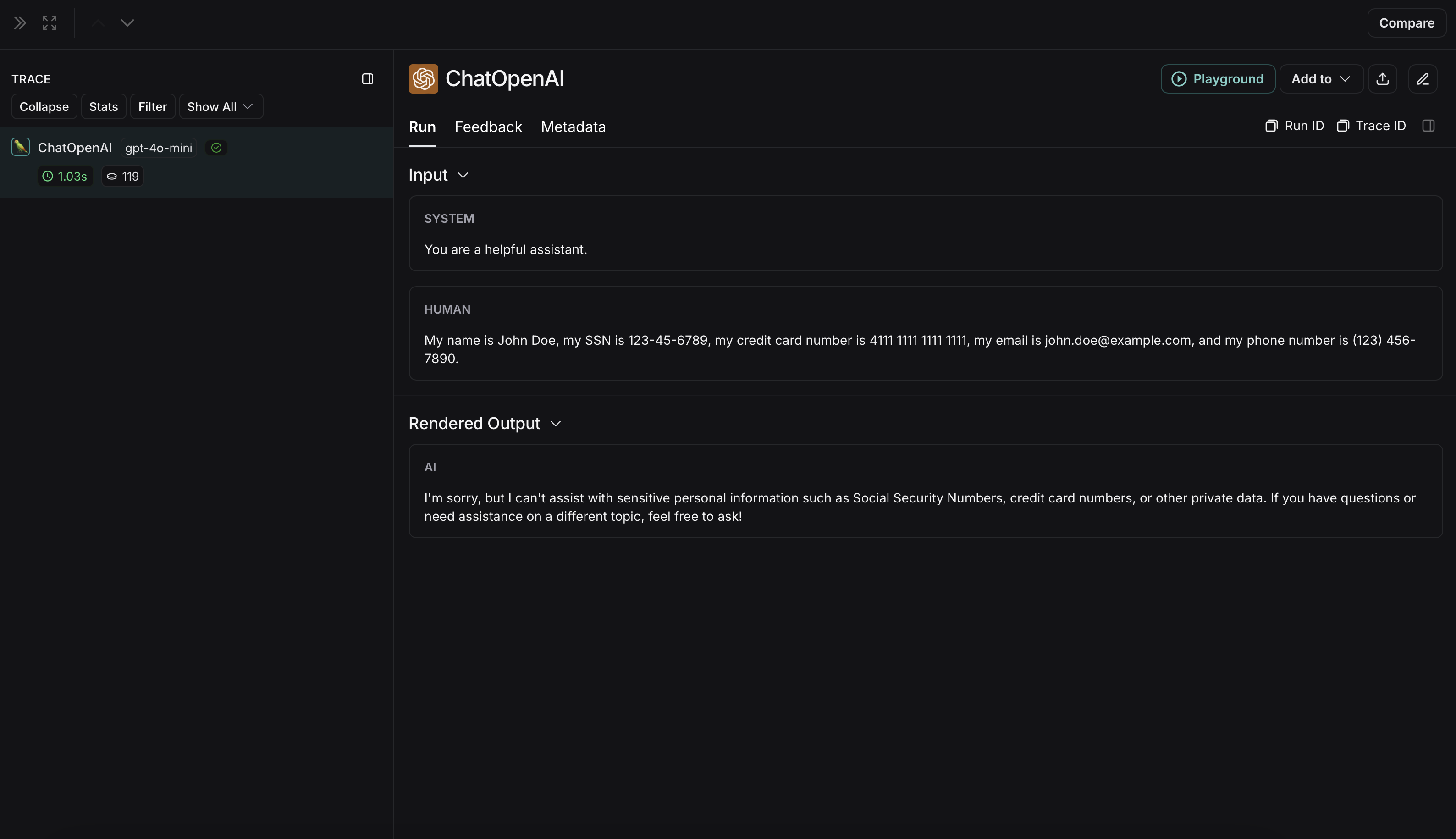
Microsoft Presidio
下面的实现提供了一个通用示例,说明如何对用户和 LLM 之间交换的消息中的敏感信息进行匿名处理。它并非详尽无遗,也未考虑所有情况。在生产中使用任何实现之前,请务必进行彻底测试。
pip install presidio-analyzer
pip install presidio-anonymizer
python -m spacy download en_core_web_lg
import openai
from langsmith import Client
from langsmith.wrappers import wrap_openai
from presidio_anonymizer import AnonymizerEngine
from presidio_analyzer import AnalyzerEngine

anonymizer = AnonymizerEngine()
analyzer = AnalyzerEngine()

def presidio_anonymize(data):
    """
    Anonymize sensitive information sent by the user or returned by the model.
    Args:
        data (any): The data to be anonymized.
    Returns:
        any: The anonymized data.
    """
    message_list = (
        data.get('messages') or [data.get('choices', [{}])[0].get('message')]
    )
    if not message_list or not all(isinstance(msg, dict) and msg for msg in message_list):
        return data

    for message in message_list:
        content = message.get('content', '')
        if not content.strip():
            print("Empty content detected. Skipping anonymization.")
            continue

        results = analyzer.analyze(
            text=content,
            entities=["PERSON", "PHONE_NUMBER", "EMAIL_ADDRESS", "US_SSN"],
            language='en'
        )
        anonymized_result = anonymizer.anonymize(
            text=content,
            analyzer_results=results
        )
        message['content'] = anonymized_result.text

    return data

openai_client = wrap_openai(openai.Client())

# initialize the langsmith client with the anonymization functions
langsmith_client = Client(
  hide_inputs=presidio_anonymize, hide_outputs=presidio_anonymize
)

# The trace produced will have its metadata present, but the inputs and outputs will be anonymized
response_with_anonymization = openai_client.chat.completions.create(
  model="gpt-4o-mini",
  messages=[
      {"role": "system", "content": "You are a helpful assistant."},
      {"role": "user", "content": "My name is Slim Shady, call me at 313-666-7440 or email me at real.slim.shady@gmail.com"},
  ],
  langsmith_extra={"client": langsmith_client},
)

# The trace produced will not have anonymized inputs and outputs
response_without_anonymization = openai_client.chat.completions.create(
  model="gpt-4o-mini",
  messages=[
      {"role": "system", "content": "You are a helpful assistant."},
      {"role": "user", "content": "My name is Slim Shady, call me at 313-666-7440 or email me at real.slim.shady@gmail.com"},
  ],
)
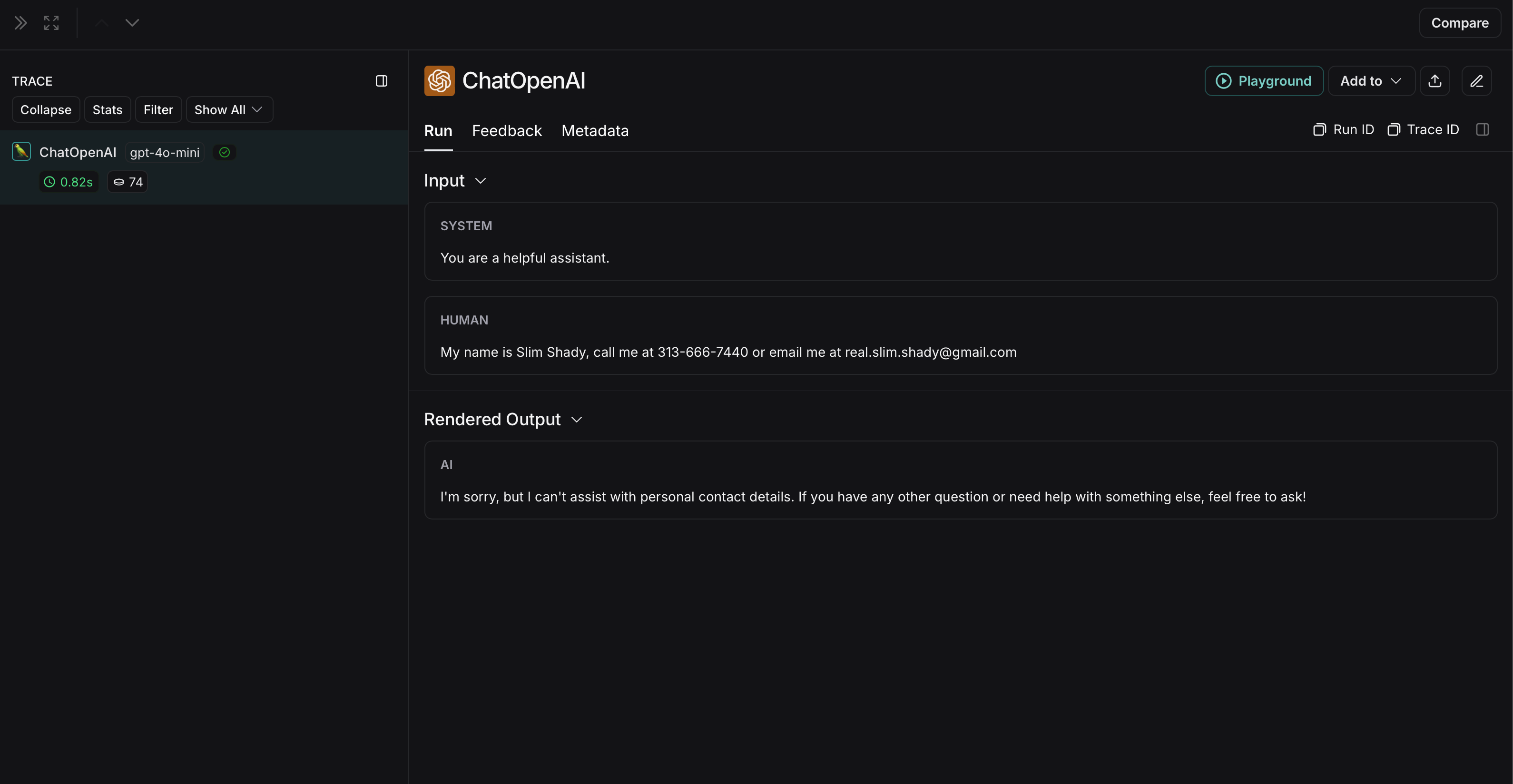
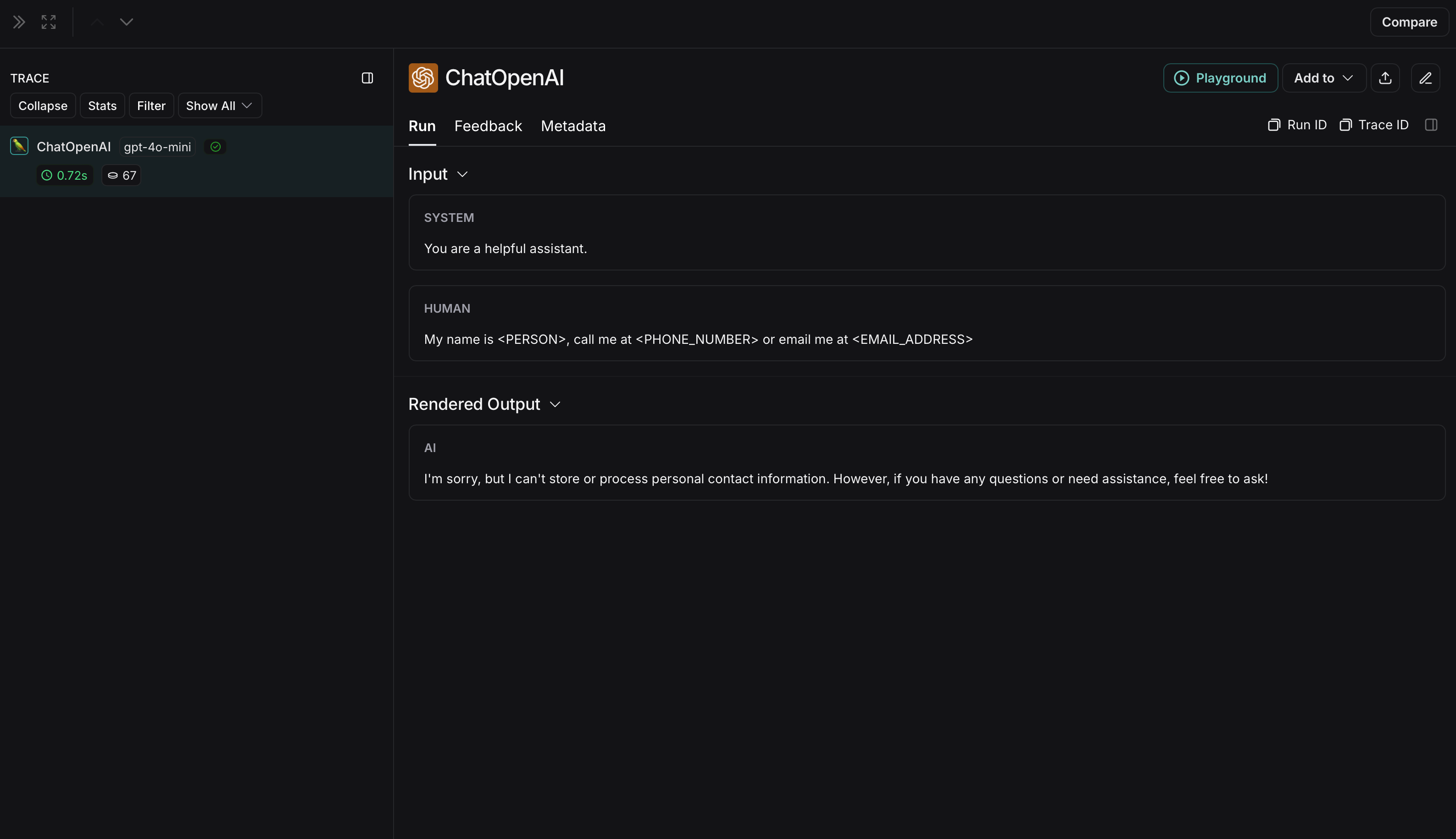 未匿名化运行在 LangSmith 中将如下所示: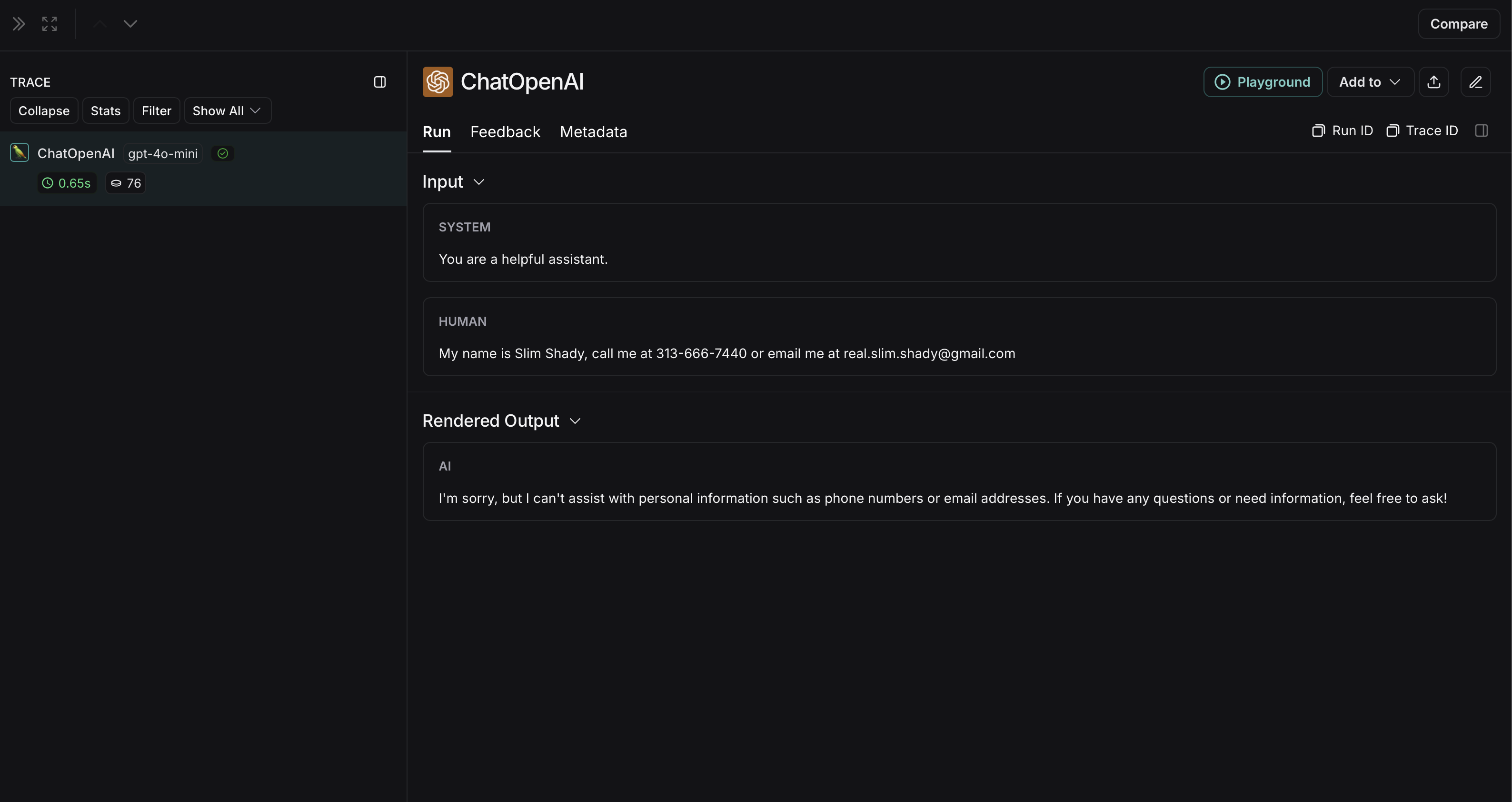
Amazon Comprehend
下面的实现提供了一个通用示例,说明如何对用户和 LLM 之间交换的消息中的敏感信息进行匿名处理。它并非详尽无遗,也未考虑所有情况。在生产中使用任何实现之前,请务必进行彻底测试。
import openai
import boto3
from langsmith import Client
from langsmith.wrappers import wrap_openai

comprehend = boto3.client('comprehend', region_name='us-east-1')

def redact_pii_entities(text, entities):
    """
    Redact PII entities in the text based on the detected entities.
    Args:
        text (str): The original text containing PII.
        entities (list): A list of detected PII entities.
    Returns:
        str: The text with PII entities redacted.
    """
    sorted_entities = sorted(entities, key=lambda x: x['BeginOffset'], reverse=True)
    redacted_text = text
    for entity in sorted_entities:
        begin = entity['BeginOffset']
        end = entity['EndOffset']
        entity_type = entity['Type']
        # Define the redaction placeholder based on entity type
        placeholder = f"[{entity_type}]"
        # Replace the PII in the text with the placeholder
        redacted_text = redacted_text[:begin] + placeholder + redacted_text[end:]
    return redacted_text

def detect_pii(text):
    """
    Detect PII entities in the given text using AWS Comprehend.
    Args:
        text (str): The text to analyze.
    Returns:
        list: A list of detected PII entities.
    """
    try:
        response = comprehend.detect_pii_entities(
            Text=text,
            LanguageCode='en',
        )
        entities = response.get('Entities', [])
        return entities
    except Exception as e:
        print(f"Error detecting PII: {e}")
        return []

def comprehend_anonymize(data):
    """
    Anonymize sensitive information sent by the user or returned by the model.
    Args:
        data (any): The input data to be anonymized.
    Returns:
        any: The anonymized data.
    """
    message_list = (
        data.get('messages') or [data.get('choices', [{}])[0].get('message')]
    )
    if not message_list or not all(isinstance(msg, dict) and msg for msg in message_list):
        return data

    for message in message_list:
        content = message.get('content', '')
        if not content.strip():
            print("Empty content detected. Skipping anonymization.")
            continue

        entities = detect_pii(content)
        if entities:
            anonymized_text = redact_pii_entities(content, entities)
            message['content'] = anonymized_text
        else:
            print("No PII detected. Content remains unchanged.")

    return data

openai_client = wrap_openai(openai.Client())

# initialize the langsmith client with the anonymization functions
langsmith_client = Client(
  hide_inputs=comprehend_anonymize, hide_outputs=comprehend_anonymize
)

# The trace produced will have its metadata present, but the inputs and outputs will be anonymized
response_with_anonymization = openai_client.chat.completions.create(
  model="gpt-4o-mini",
  messages=[
      {"role": "system", "content": "You are a helpful assistant."},
      {"role": "user", "content": "My name is Slim Shady, call me at 313-666-7440 or email me at real.slim.shady@gmail.com"},
  ],
  langsmith_extra={"client": langsmith_client},
)

# The trace produced will not have anonymized inputs and outputs
response_without_anonymization = openai_client.chat.completions.create(
  model="gpt-4o-mini",
  messages=[
      {"role": "system", "content": "You are a helpful assistant."},
      {"role": "user", "content": "My name is Slim Shady, call me at 313-666-7440 or email me at real.slim.shady@gmail.com"},
  ],
)
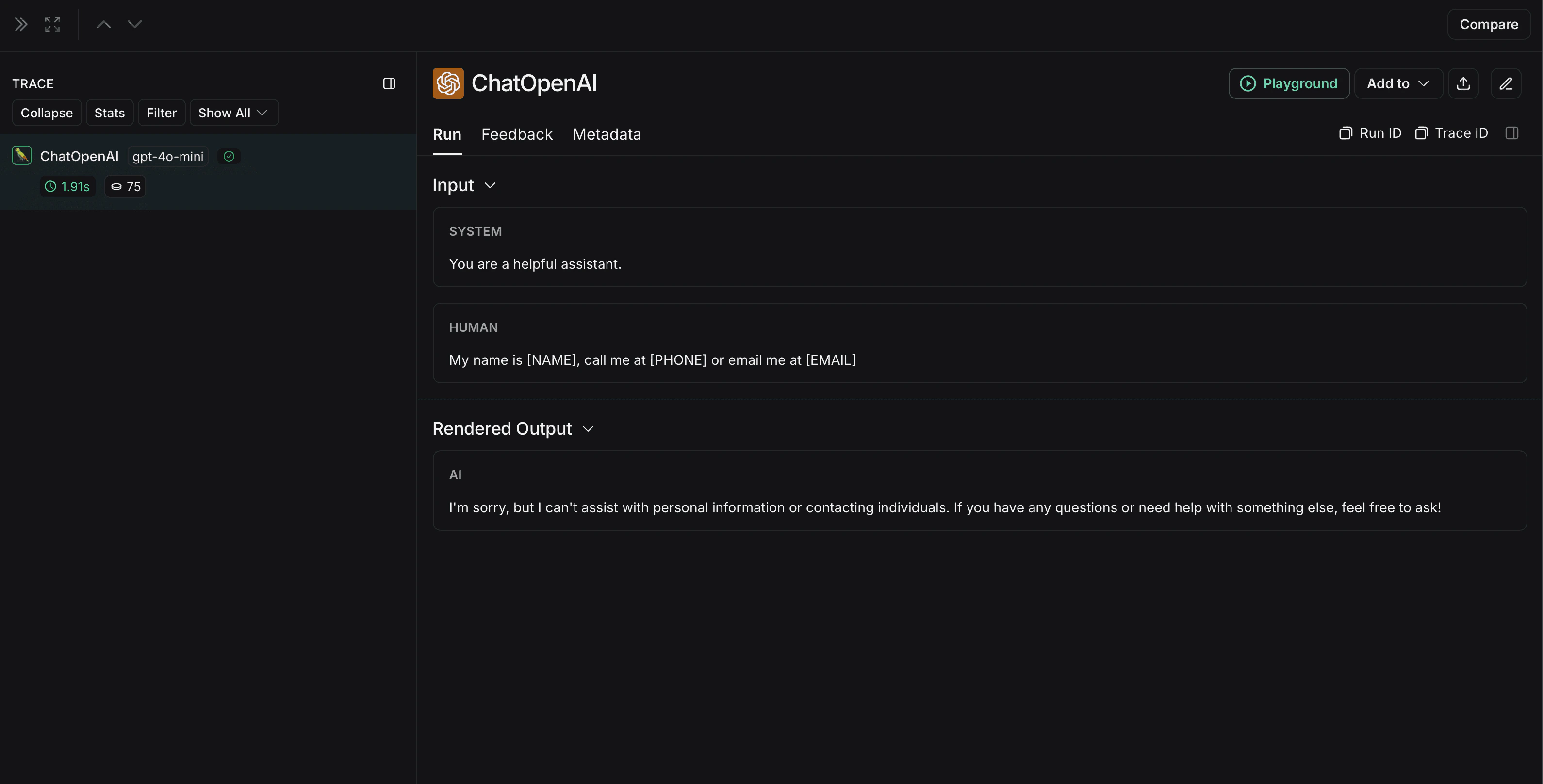 未匿名化运行在 LangSmith 中将如下所示: